Make.com Projects
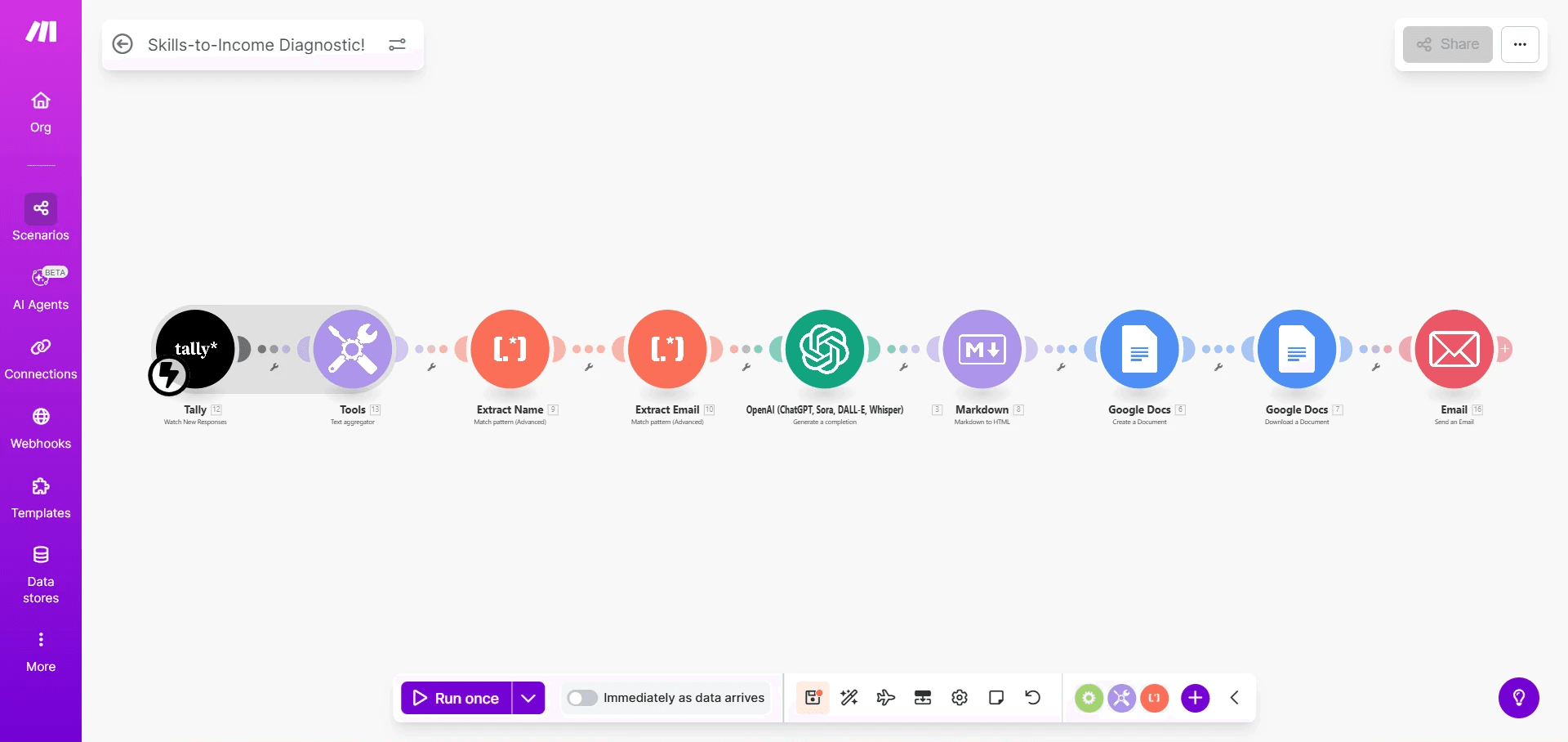
Skills to Income Diagnostic Automation End to End Analysis Workflow
Overview:
A client needed a way to collect more than thirty detailed responses from a Tally form and instantly convert them into a professional Skills to Income Report. This was not a simple form submission task. They wanted an automated system that reads, understands and analyzes all answers at once and then produces a human-like personalized career report through advanced prompting.
The Challenge:
The client had long form responses, multiple choice fields and arrays spread across thirty questions. They needed everything combined into one coherent text block so an AI model could interpret it correctly. Tally does not provide this type of combined output and the client needed the following:
• A single merged dataset that ChatGPT could understand
• Automatic extraction of the users name and email from the combined text
• A clean reliable output that could be used for follow up through email
• An analysis that feels expert written not auto generated
The Solution:
I created a fully automated workflow that collects every answer from the Tally form all thirty questions and merges them into one organized block of text using Make dot coms Text Aggregator. After that I crafted precise prompts that guide ChatGPT to produce a detailed personalized career analysis for each user.
I also wrote custom regex logic to extract the users’ name and email directly from the combined text. This made the system more stable and ensured the email module always received clean and accurate data even if users entered information inconsistently.
The Result:
The system now produces a polished human sounding Skills to Income Report automatically within seconds of each submission. The client can analyze user skills at scale follow up instantly with personalized email and operate their program without any manual review.
This automation turned a complex multi step workflow into a smooth intelligent and completely hands off process which is exactly what the client needed to grow and operate efficiently.
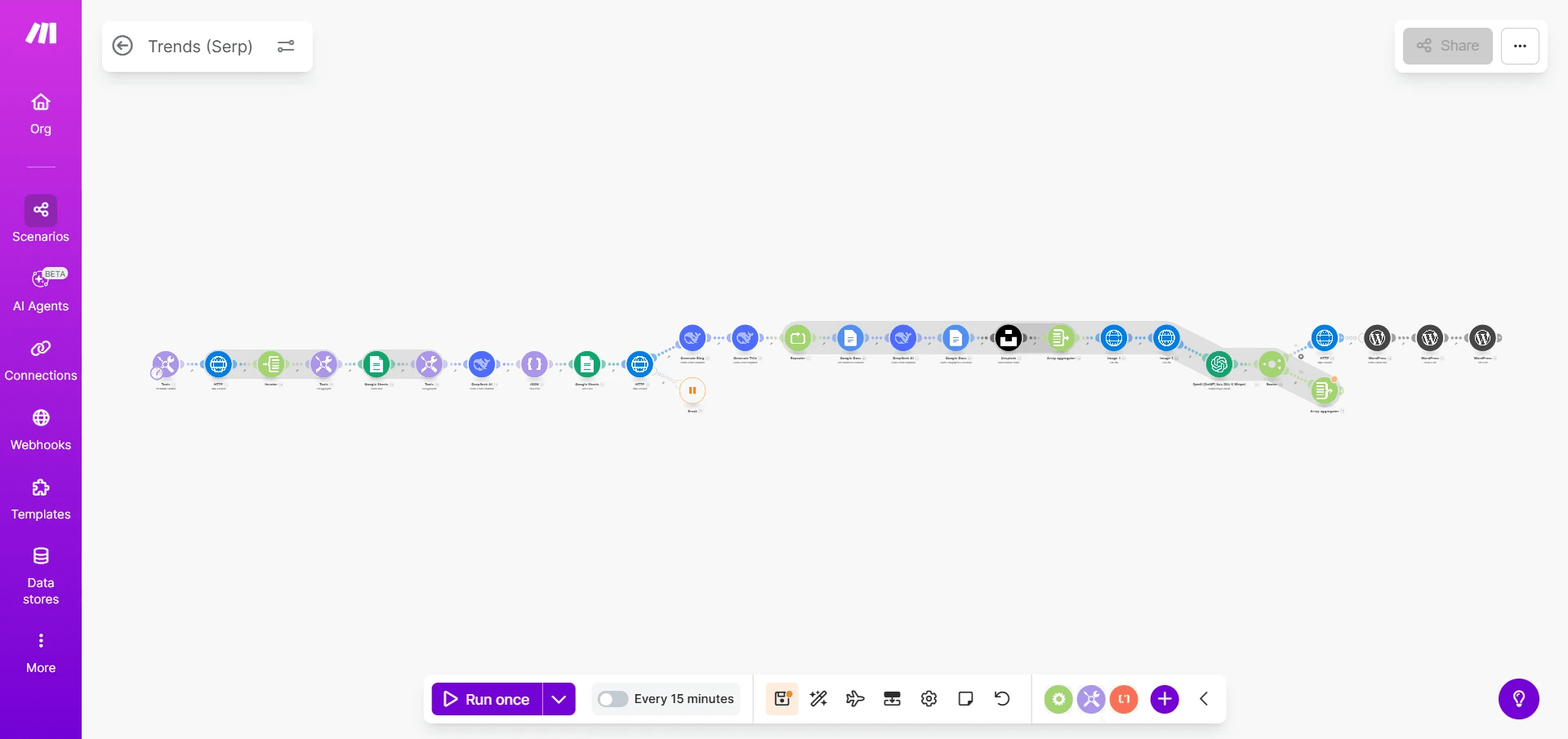
Automated Trend Research and Blog Creation Workflow
Overview:
A client wanted a system that could research trending topics, create high quality WordPress blog posts and automatically add relevant images without any manual work. The goal was to turn fresh online trends into complete publish ready articles within minutes.
The Challenge:
The workflow needed to handle several complex steps. It had to fetch topics from Google Trends, get related links with the Serp API, scrape those links, rewrite the content into an original blog post and then publish it to WordPress. It also needed to pull both featured images and inline content images from Unsplash.
The most technically demanding part was image approval. The client has a strict brand principle and not every Unsplash image fits their style. Make dot com does not have a loop function so creating a system that checks an image and then returns to get a new one when needed required creativity and heavy logic work.
The Solution:
I built a full automated pipeline that takes a trending topic, scrapes useful information, rewrites it into a clean well structured WordPress article and organizes both featured and content images from Unsplash. To maintain quality I added an AI approval step. Every image is analyzed by OpenAI and if it does not align with the clients brand the workflow uses a repeater setup to request a new one. The repeater acted as a custom made loop which allowed the system to keep trying until the right image was found.
The Result:
The client now has a reliable system that turns trending topics into fully written fully illustrated blog posts without any manual involvement. The workflow researches, writes edits and selects brand safe images on its own. This saves hours of work every week and ensures the client always has fresh content ready for publishing.
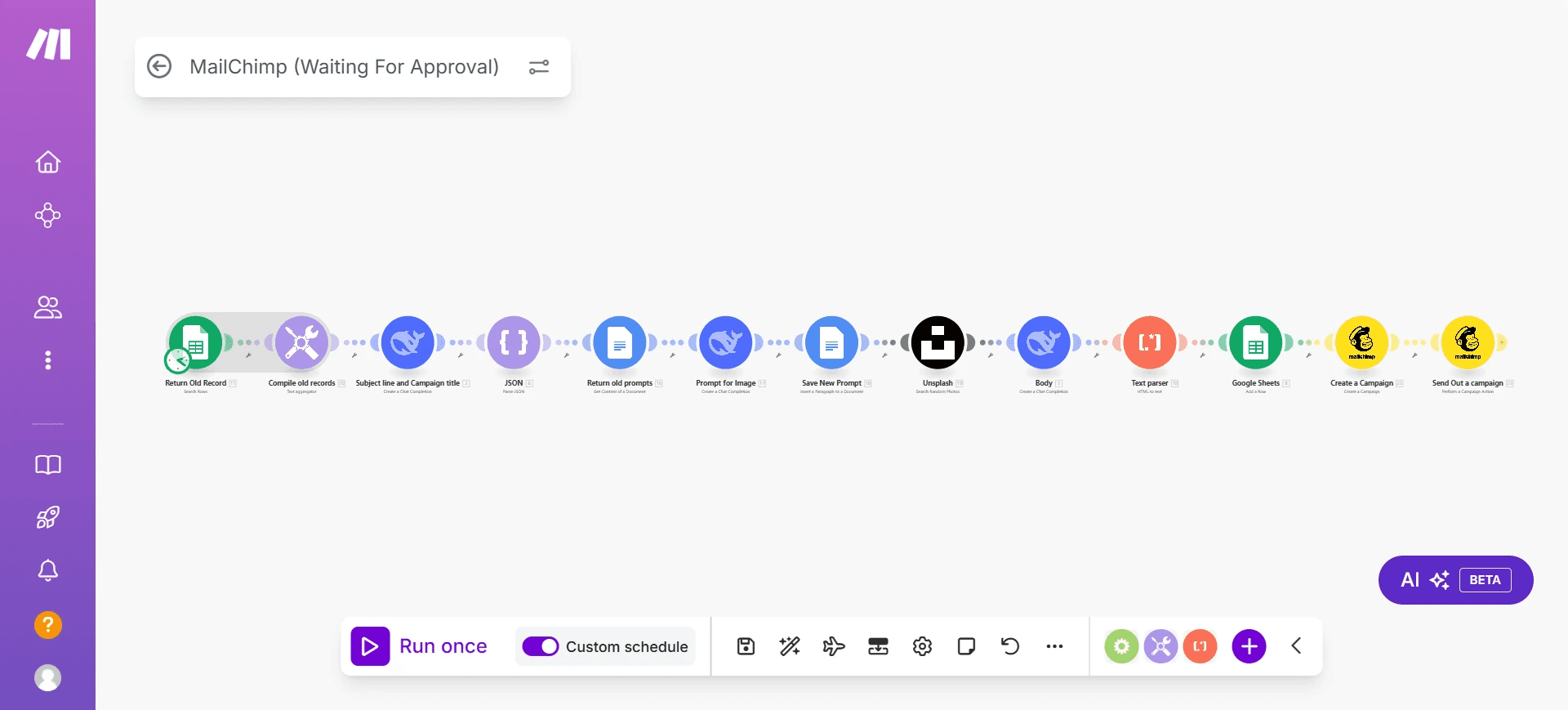
Automated Mailchimp Campaign System for Weekly Email Delivery
Overview:
A client wanted a fully automated email system that sends campaigns to all subscribers three times a week without any manual writing, editing or scheduling. The goal was to keep the audience engaged consistently while removing the stress of preparing frequent content.
The Challenge:
The client needed a workflow that could pull existing content, prepare a new subject line, create a fresh email copy, generate an image that matches the message, check if the image aligns with their brand and then send the final campaign to all subscribers. They also wanted the process to run on a fixed weekly schedule without touching anything themselves.
The Solution:
I built a complete automation inside Make dot com that handles every part of the campaign. It retrieves old records, compiles previous messages, generates a new subject line, prepares the body of the email and requests a matching image. Each image is analyzed with OpenAI to make sure it fits the clients brand values. If the image does not match the system requests a new one from Unsplash and repeats the process until the result is acceptable. After that the workflow updates Google Sheets, creates the campaign inside Mailchimp and sends it out automatically based on the chosen weekly schedule.
The Result:
The client now sends consistent fresh and brand aligned Mailchimp campaigns three times a week without writing a single line of content. The system handles research writing, review image checking and delivery without any manual work. This has saved the client long hours every week and keeps their audience engaged with high quality automated email content.
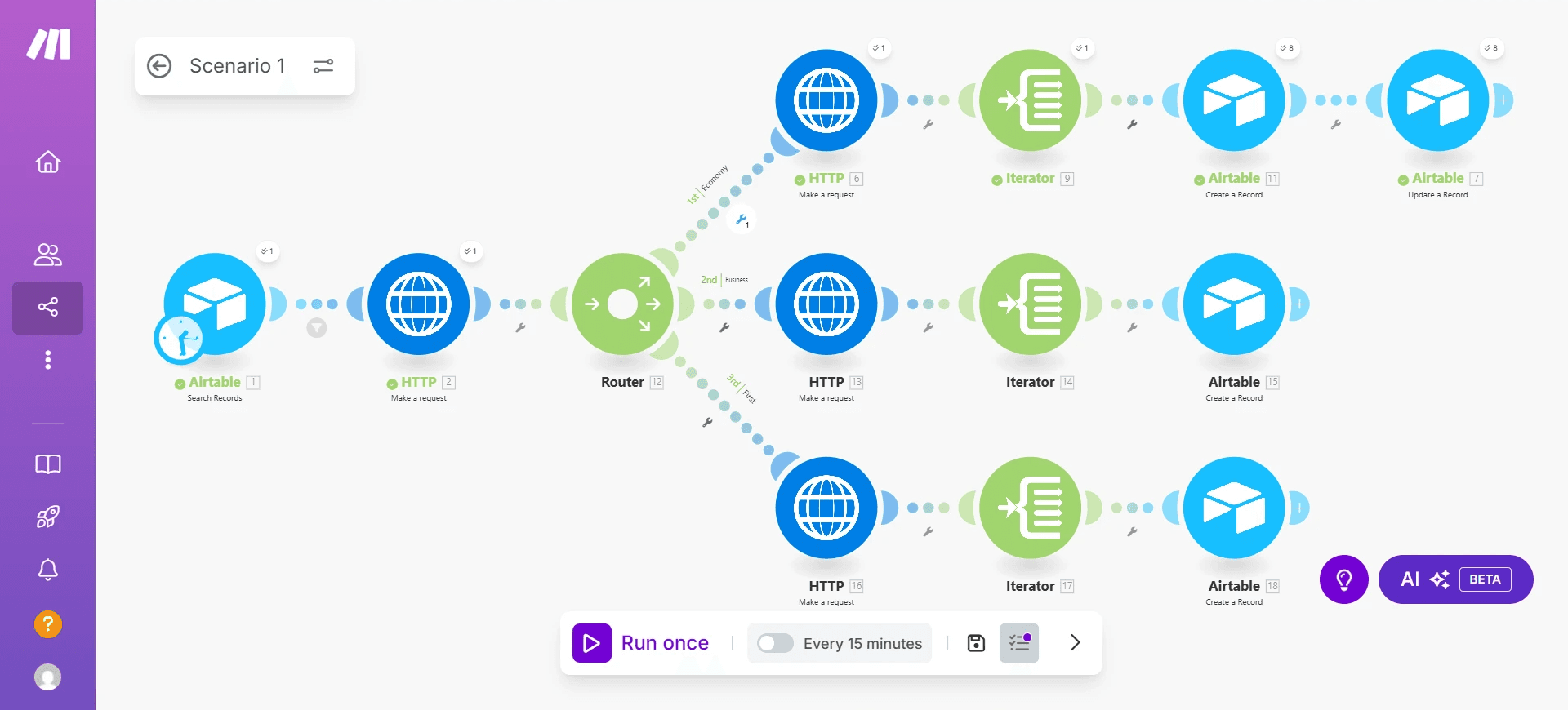
Flight Availability & Pricing Automation for Travel Company
Overview:
A travel company needed a fast, reliable, and automated way to fetch real time flight availability and pricing for customers. Their manual process required checking multiple dates, comparing airlines, reviewing cabin classes, and searching for the cheapest or best options one by one. This slowed down their response time and limited how many clients they could serve. To solve this, I built an automated system that connects to the Amadeus API and retrieves detailed flight data such as departure times, cabin type, stops, pricing categories, and overall comparisons based on the traveler’s origin and destination.
The Challenge:
The client needed more than a simple API request. They wanted an end to end workflow that could accept a user’s take off point, destination, and optional date ranges, fetch all flight options dynamically from Amadeus, and compare flights using multiple factors including price, duration, number of stops, and cabin class. They also wanted the system to automatically identify and highlight the best and cheapest options, store all results in Airtable, and generate a clean and readable output for customer communication.
Amadeus returns large nested JSON structures which required parsing, iterating, routing by cabin category, and extracting only the useful data points from complex arrays.
The Solution:
Using Make dot com I designed a fully automated multi branch workflow that receives user inputs, queries the Amadeus API and routes flight results based on cabin class. Iterators process every nested list including flight segments, airline information, and price breakdowns. Custom comparison logic then evaluates the results to determine the cheapest option and the best overall option based on the balance between price, number of stops, and total travel time.
The system extracts all key information such as airline name, flight duration, number of stops, departure and arrival times, and cabin class. All processed data is stored neatly inside Airtable with separate records for each cabin type and result category. Everything is formatted for readability so the travel company can easily review or send results directly to customers.
The Result:
The automation now delivers accurate real time flight results within seconds which eliminated the client’s long manual search process. They can instantly provide customers with the cheapest flights, the best recommended flights, cabin specific options and multi date comparisons. This system significantly increased their efficiency, improved their customer response time, and created a more professional and scalable workflow.
Automated Social Media Content Publishing From Image Library
Overview:
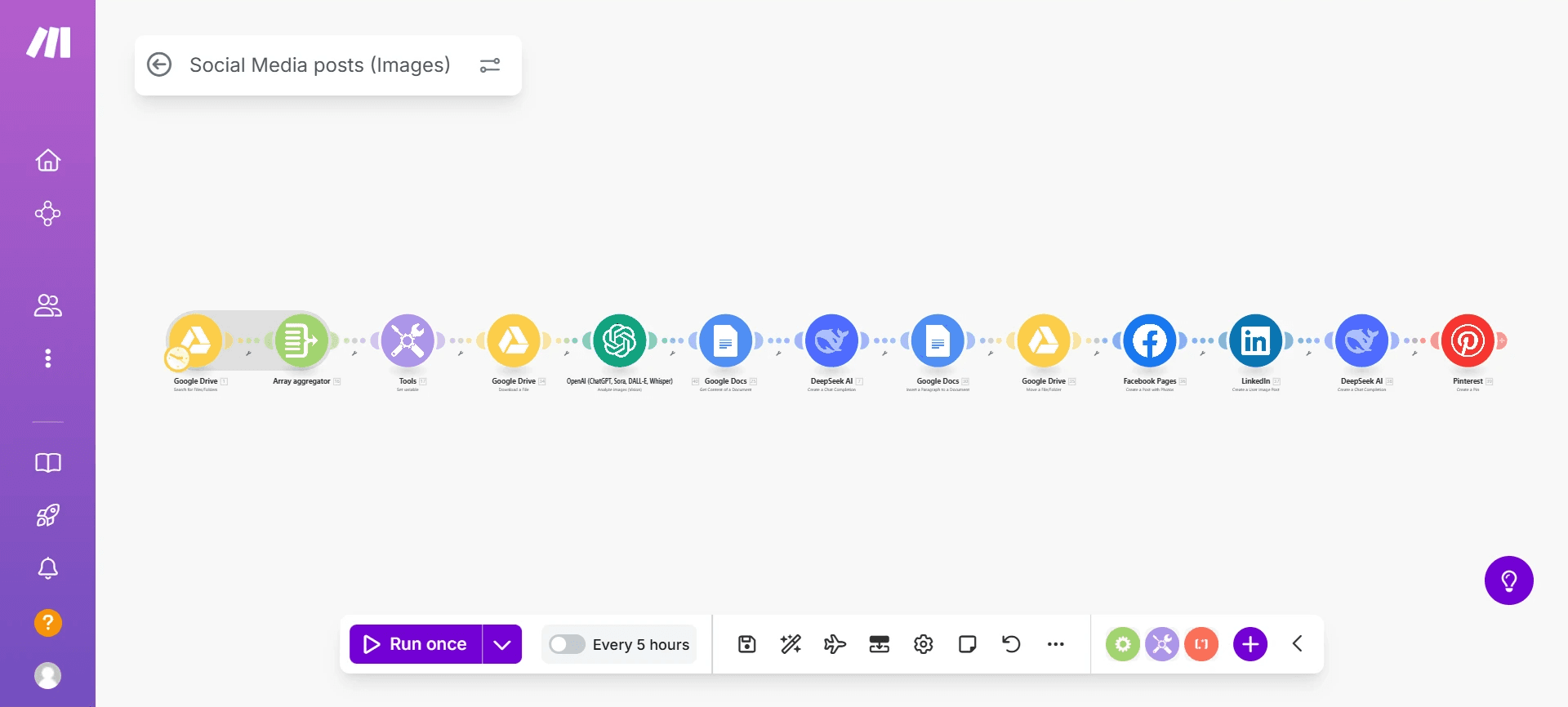
A company had over three months worth of social media content already designed in image form but no captions, no SEO optimization, and no efficient way to publish consistently. They needed a fully automated system that could analyze each image, write a relevant caption, optimize it for keywords, and publish across multiple platforms several times per day without any manual work.
To meet their needs, I built a complete image to caption to publishing workflow using Make dot com, OpenAI vision models, DeepSeek, Google Drive, Google Docs, and direct social media integrations.
The Challenge:
The client did not have written content for any of the images. Every post needed a unique caption that was aligned with the message in each image and optimized for SEO. They also needed a system that could take hundreds of images stored in Google Drive, process them in batches, and reliably post them to multiple platforms including Facebook, LinkedIn, and Pinterest.
The workflow needed to perform several complex steps including image interpretation, content generation, batching, scheduling, and cross platform posting without human intervention. Additionally, the client needed captions that felt natural, engaging, and tailored to their industry rather than generic or repetitive AI text.
The Solution:
I created an automated pipeline in Make dot com that starts by pulling images directly from Google Drive and compiling them into an array. OpenAI’s vision model analyzes each image and generates a detailed understanding of what the picture represents. This interpretation is then passed into a prompt that produces a high quality caption, including SEO rich keywords and a consistent brand voice.
The workflow saves the generated captions into Google Docs for recordkeeping. DeepSeek AI is used to further refine the text and create variations where needed. Once the content is ready, the system automatically publishes the posts to Facebook Pages, LinkedIn, and Pinterest according to the client’s posting schedule. All posts are handled automatically and run multiple times per day.
The Result:
The company now publishes up to three optimized social media posts a day for an entire quarter without manually writing captions or uploading anything. The automation saves them hours of work daily, ensures consistent posting across multiple channels, and improves engagement thanks to image specific captions and keyword rich descriptions. Their entire content calendar runs hands free, allowing them to focus on strategy while the system handles execution at scale.